Fixing “No Gowin devices found!” in Gowin Programmer on Linux
The Gowin Programmer can fail to find the Tang Primer 20K on Linux because ftdi_sio claims its onboard FTDI JTAG interface. Here are three ways to fix it while keeping UART available.
On Linux, the Gowin Programmer can fail to detect the Tang Primer 20K’s onboard USB-JTAG interface, even though the board is plugged in and appears normally in lsusb.
In this case, the kernel’s ftdi_sio driver automatically binds to the board’s FTDI interfaces and exposes them as serial ports. This prevents the Gowin Programmer from opening the JTAG interface through the FTD2XX driver.
There are three ways to fix it:
- Disable the FTD2XX driver
- Manually unbind the JTAG interface
- Automatically unbind the JTAG interface with a udev rule
What the error looks like
In the graphical interface
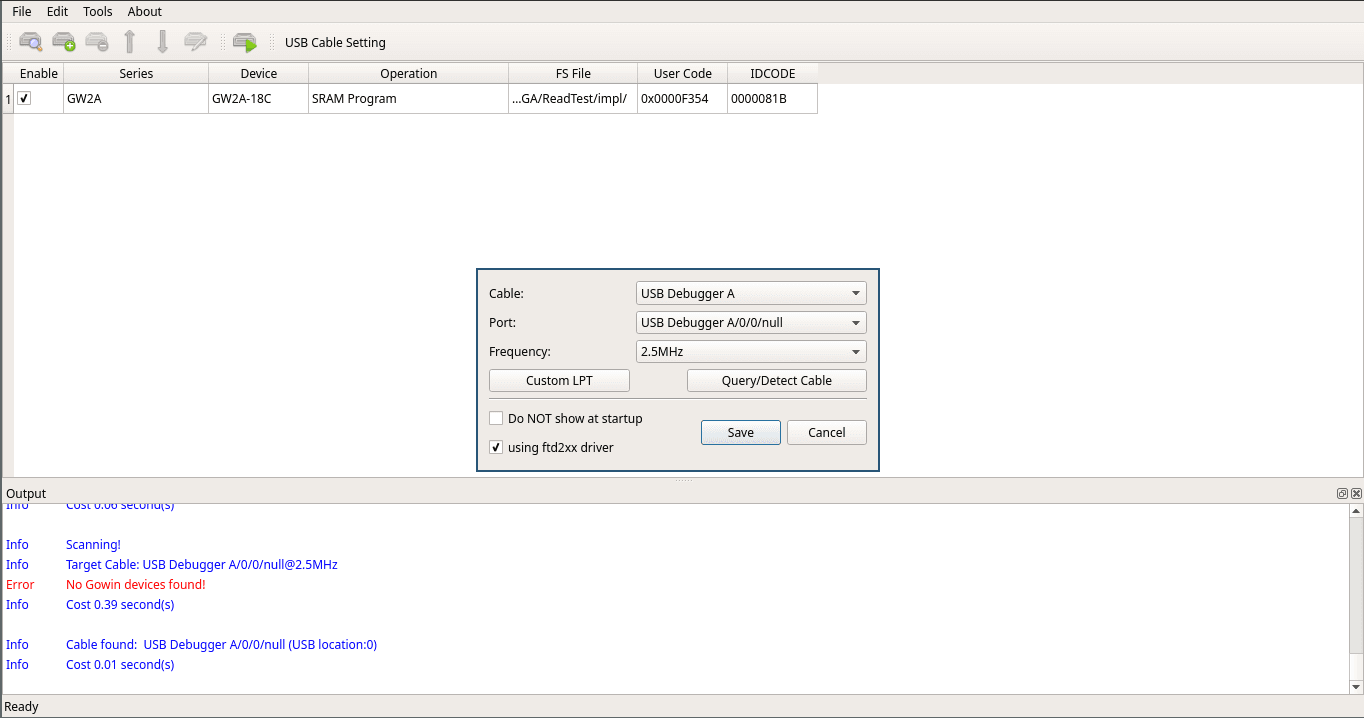
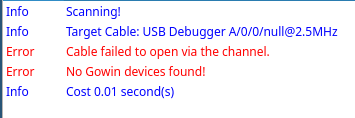
From the command line
$ programmer_cli --scan
 Scanning!
 Target Cable: Gowin USB Cable(FT2CH)/0/None/[email protected]

Error: Cable failed to open via the channel.

Error: No Gowin devices found!
 Cost 0.01 second(s)
dmesg shows what happens when the board is connected. The ftdi_sio driver claims both interfaces of the onboard FT2232-compatible device with VID:PID 0403:6010 and exposes them as ttyUSB0 and ttyUSB1.
$ sudo dmesg -w
...
[13480.512625] usb 2-2: new full-speed USB device number 6 using xhci_hcd
[13480.636928] usb 2-2: not running at top speed; connect to a high speed hub
[13480.637656] usb 2-2: New USB device found, idVendor=0403, idProduct=6010, bcdDevice= 5.00
[13480.637661] usb 2-2: New USB device strings: Mfr=1, Product=2, SerialNumber=3
[13480.637664] usb 2-2: Product: JTAG Debugger
[13480.637666] usb 2-2: Manufacturer: SIPEED
[13480.637668] usb 2-2: SerialNumber: FactoryAIOT Pro
[13480.640913] ftdi_sio 2-2:1.0: FTDI USB Serial Device converter detected
[13480.640943] usb 2-2: Detected FT2232C/D
[13480.641291] usb 2-2: FTDI USB Serial Device converter now attached to ttyUSB0
[13480.641468] ftdi_sio 2-2:1.1: FTDI USB Serial Device converter detected
[13480.641501] usb 2-2: Detected FT2232C/D
[13480.643898] usb 2-2: FTDI USB Serial Device converter now attached to ttyUSB1
On this board, interface 1.0 is used for JTAG and interface 1.1 is used for UART. Only interface 1.0 needs to be released from ftdi_sio.
Fix options
Disable the FTD2XX driver
The Gowin Programmer cable settings window contains a using ftd2xx driver checkbox.
With it enabled, which is the default, the programmer accesses the cable through the FTD2XX driver. This conflicts with ftdi_sio when Linux has already claimed the JTAG interface.
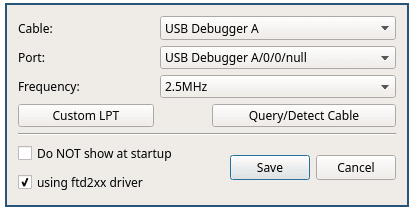
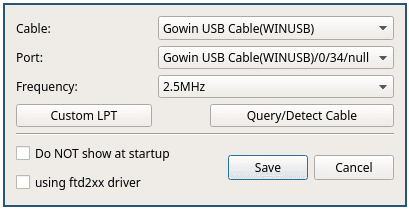
Disable the using ftd2xx driver checkbox and press Query/Detect Cable.
The programmer should detect the cable as:
Gowin USB Cable(WINUSB)This is the simplest fix because it does not require root access, a udev rule or a repeated manual step.
Manually unbind the JTAG interface
List the interfaces currently bound to ftdi_sio:
$ ls /sys/bus/usb/drivers/ftdi_sio
2-2:1.0  2-2:1.1  bind  module  uevent  unbind
Unbind only interface 1.0:
echo -n "2-2:1.0" | sudo tee /sys/bus/usb/drivers/ftdi_sio/unbindInterface 1.1 remains attached to ftdi_sio, so ttyUSB1 stays available for UART.
After this, programmer_cli --scan and the Gowin Programmer UI should find the cable:
$ programmer_cli --scan
 Scanning!
 Target Cable: Gowin USB Cable(FT2CH)/0/None/[email protected]
Device Info:
 	Family: GW2AR
	Name: GW2A-18C GW2AR-18C  (One of them)
	ID: 0x0000081B
 1 device(s) found!
 Cost 0.57 second(s)
The downside is that this must be repeated whenever the board is unplugged and reconnected because the driver binds to the interface again during USB enumeration.
The device path, 2-2 in this example, depends on which USB port the board is connected to. Check ls /sys/bus/usb/drivers/ftdi_sio to find the current path.
Automatically unbind the JTAG interface with a udev rule
A udev rule can automatically unbind interface 1.0 whenever the board is connected.
Interface 1.1 remains attached to ftdi_sio, keeping the UART available.
Create /etc/udev/rules.d/99-gowin.rules with the following content:
ACTION=="add", SUBSYSTEM=="usb", ENV{DEVTYPE}=="usb_interface", KERNEL=="*:1.0", ATTRS{idVendor}=="0403", ATTRS{idProduct}=="6010", ATTRS{manufacturer}=="SIPEED", RUN+="/bin/sh -c 'echo -n %k > /sys/bus/usb/drivers/ftdi_sio/unbind'"The rule matches interface 1.0 on the board’s FTDI device and unbinds only that interface from ftdi_sio.
Reload the rules:
sudo udevadm control --reload-rulesUnplug and reconnect the board.
The kernel may briefly attach ftdi_sio to interface 1.0 before the rule runs. It should then disconnect that interface while leaving interface 1.1 attached:
[23266.484375] ftdi_sio 2-2:1.0: FTDI USB Serial Device converter detected
[23266.484524] usb 2-2: Detected FT2232C/D
[23266.487088] usb 2-2: FTDI USB Serial Device converter now attached to ttyUSB0
[23266.487432] ftdi_sio 2-2:1.1: FTDI USB Serial Device converter detected
[23266.487475] usb 2-2: Detected FT2232C/D
[23266.487827] usb 2-2: FTDI USB Serial Device converter now attached to ttyUSB1
[23266.531257] ftdi_sio ttyUSB0: FTDI USB Serial Device converter now disconnected from ttyUSB0
[23266.531283] ftdi_sio 2-2:1.0: device disconnected
The Gowin Programmer should now detect the FPGA automatically, while ttyUSB1 remains available for UART.
Conclusion
All three fixes work around the same root cause: ftdi_sio claiming the Tang Primer 20K’s JTAG interface before the Gowin Programmer can use it.
Disabling using ftd2xx driver is the simplest option when using the graphical interface. Manually unbinding interface 1.0 works well for a one-off session, while a udev rule is the best option if you want the fix applied automatically whenever the board is connected.
Only interface 1.0 needs to be unbound. Interface 1.1 can remain attached to ftdi_sio, keeping the UART available.